
DTF

Quick presets and TIFF output

Carry the production requirements into the file.

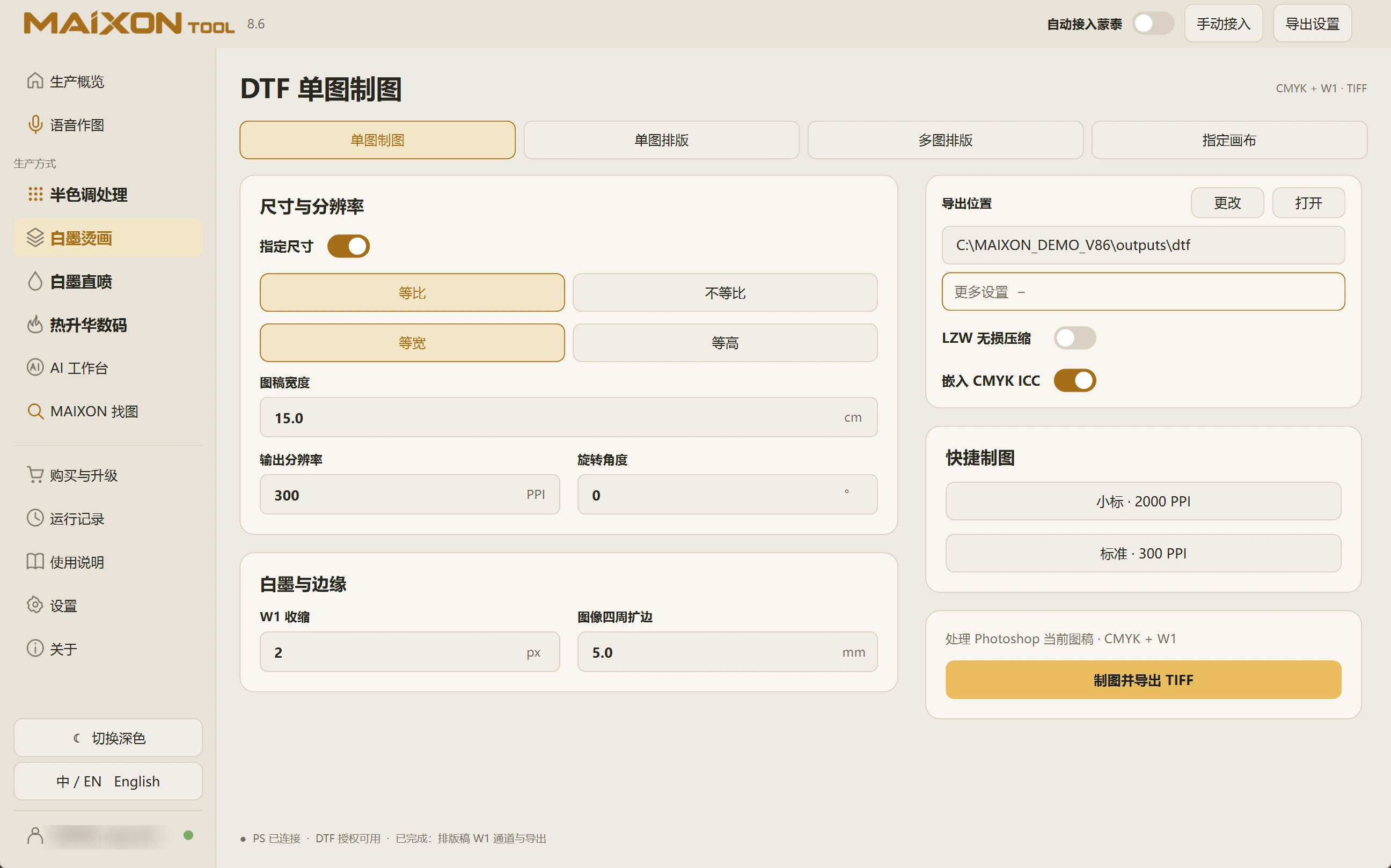
Choose the small-label or standard preset, review resolution, LZW compression and CMYK ICC options, then create a production file with W1.

MAIXON TOOL V8.6 Quick presets and TIFF output — light interface
Quick presets and TIFF output

01

Start with a preset and review it.

Small Label at 2000 PPI and Standard at 300 PPI provide quick starting points. Review size, resolution, rotation and edge settings for the actual use.

Choose a separate export location and keep originals so source artwork and production results stay identifiable.

02

Review output options.

Check LZW lossless compression and embedded CMYK ICC options. Confirm the current Photoshop document, then process and export the TIFF.

Open it to inspect CMYK, W1, PPI and canvas size. Review MainTop settings and the corresponding task when continuing automatically.

MAIXON × MainTopArtwork prepared. Continue into MainTop.

Keep exploring.

Choose your operating system

Select the version that matches your computer.

  1. 01

    Windows 7

    V8.3

    Download
  2. 02

    Windows 10

    V8.3

    Download
  3. 03

    Windows 11

    V8.3

    Download
  4. 04

    macOS

    Coming Soon