
DTF

Repeated layouts by area

Plan the sheet by area. Confirm each stage.

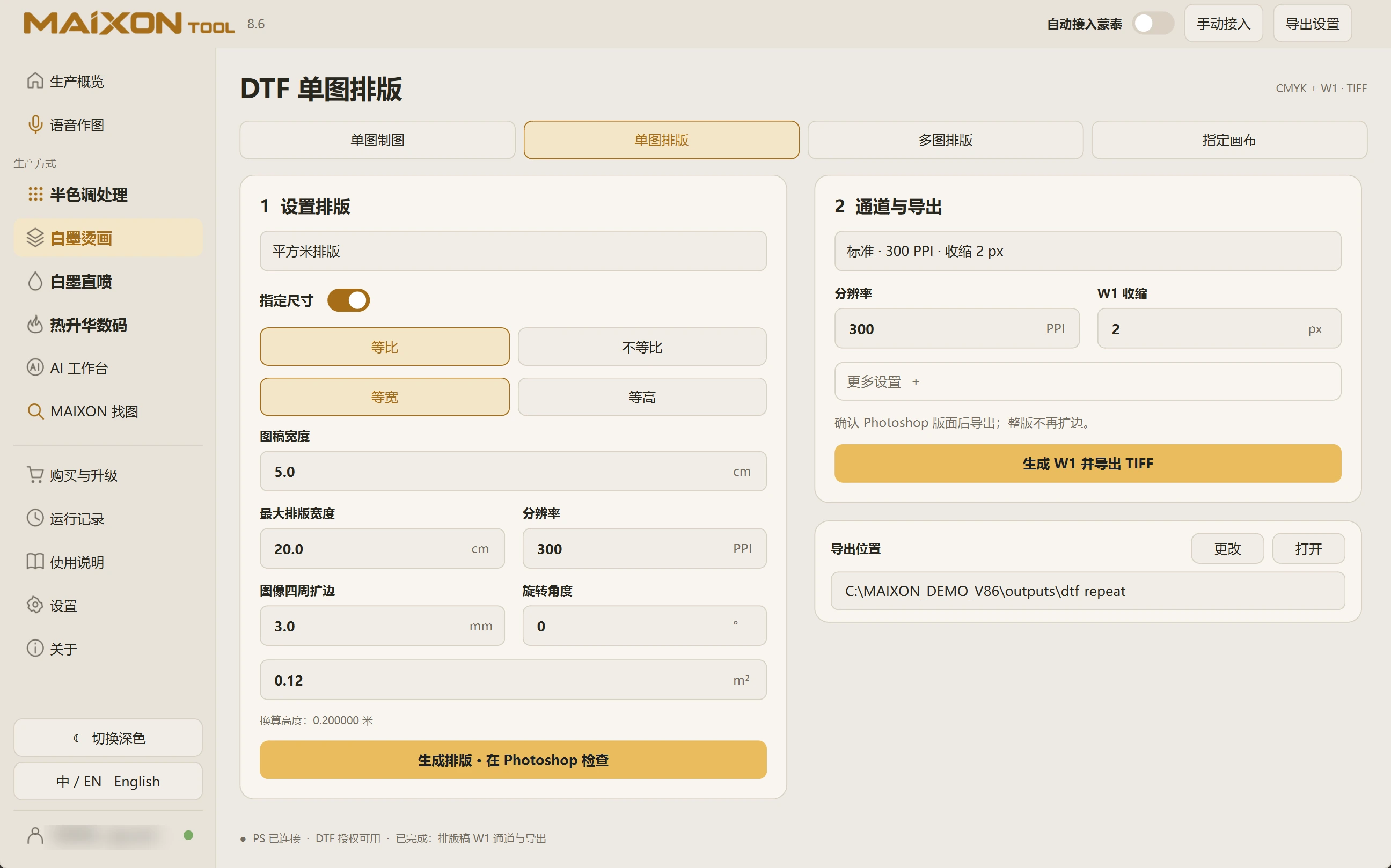
Set maximum width, target area, artwork size and margins. Generate the layout first, then create W1 and export the TIFF.

MAIXON TOOL V8.6 Repeated layouts by area — light interface
Repeated layouts by area

01

Define the image and layout bounds.

Choose area-based Repeated Layout. Review proportional or independent sizing, artwork dimensions, maximum width, margins, rotation and target area.

Check the calculated height against the artwork. The layout must have enough room to hold complete images.

02

Check the layout before creating white ink.

Generate the layout and inspect rows, quantity, spacing and completeness in Photoshop. This stage prepares the arrangement.

With the layout document active, review resolution and W1 choke, then generate W1 and export TIFF. This stage does not add margins to the sheet again.

MAIXON × MainTopArtwork prepared. Continue into MainTop.

Keep exploring.

Choose your operating system

Select the version that matches your computer.

  1. 01

    Windows 7

    V8.3

    Download
  2. 02

    Windows 10

    V8.3

    Download
  3. 03

    Windows 11

    V8.3

    Download
  4. 04

    macOS

    Coming Soon