
SUBLIMATION

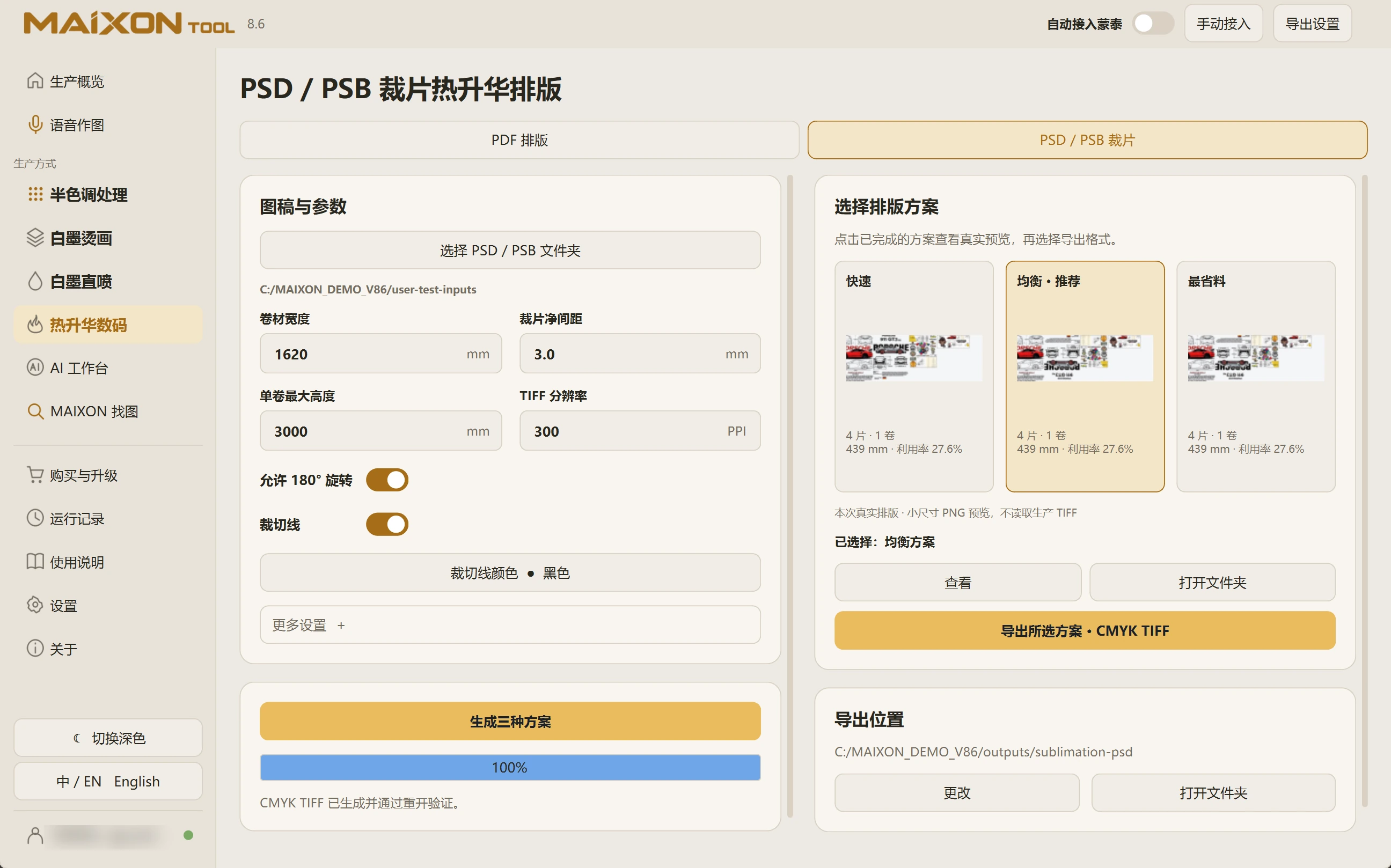
PSD / PSB piece layout

From Photoshop pieces to a planned roll.

Choose a PSD / PSB folder, set roll width, spacing and direction, compare three layouts and export CMYK TIFF.

MAIXON TOOL V8.6 PSD / PSB piece layout — light interface
PSD / PSB piece layout

01

Choose the workflow for the source files.

Open PSD / PSB Pieces and select the folder. Check piece count and content.

Set roll width, clear spacing, maximum roll height and TIFF resolution. Review whether 180° rotation is allowed when direction matters.

02

Compare and export.

Enable cutting lines and select their color as needed. Generate fast, balanced and material-saving layouts, comparing direction, utilization and rolls.

Export the selected layout as CMYK TIFF and inspect complete pieces, actual width and boundaries in the file.

Keep exploring.

Choose your operating system

Select the version that matches your computer.

  1. 01

    Windows 7

    V8.3

    Download
  2. 02

    Windows 10

    V8.3

    Download
  3. 03

    Windows 11

    V8.3

    Download
  4. 04

    macOS

    Coming Soon