
SUBLIMATION

Paper width and layout options

Fit the paper. Compare the arrangements.

Customize roll width, spacing and direction rules, then compare fast, balanced and material-saving layouts.

PDF pattern layout, from roll width to cut lines0:59

01

Define the usable area.

Enter the actual paper width, such as 1820 mm, then check clear spacing and maximum roll height. Enter a different width for a different roll.

Review rotation rules for grain direction and one-way designs. Additional PDF settings include rotation rules, free-rotation step and optimization iterations.

02

Compare the three options.

After generation, compare piece count, roll count, layout height and utilization. The material-saving option may take longer to compute.

Choose with direction, cutting convenience and material use in mind. Wait for a complete layout before viewing or exporting it.
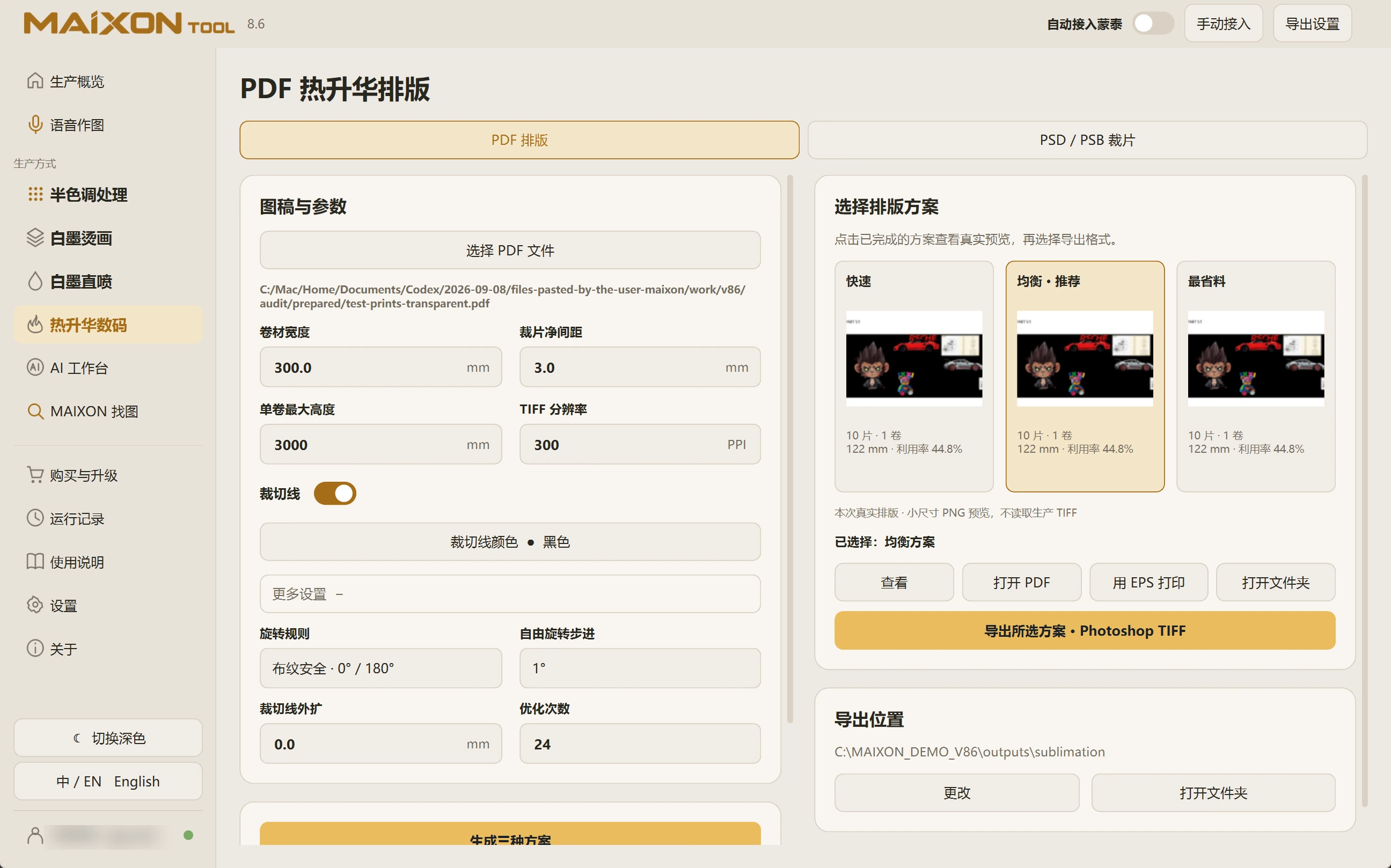
MAIXON TOOL V8.6 Paper width and layout options — light interface
Paper width and layout options

Keep exploring.

Choose your operating system

Select the version that matches your computer.

  1. 01

    Windows 7

    V8.3

    Download
  2. 02

    Windows 10

    V8.3

    Download
  3. 03

    Windows 11

    V8.3

    Download
  4. 04

    macOS

    Coming Soon